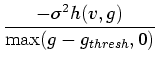
The opacity functions considered so far have assigned opacity based on data value alone. Value-based opacity functions are easy to implement and facilitate simple and efficient rendering algorithms. Higher quality renderings can sometimes be obtained, however, if the opacity is assigned as a function of both data value and gradient magnitude. We term these two dimensional opacity functions. Defining these two dimensional opacity functions by hand is especially challenging because there are even more degrees of freedom than in one dimensional, value-based opacity functions. Fortunately, the ideas presented so far easily generalize to allow semi-automatic generation of two dimensional opacity functions.
Analogous to the definition of  , we define
  to be
the average second derivative over all locations where the data value is
to be
the average second derivative over all locations where the data value is
 and the gradient magnitude is
  . As before, this information
can be extracted from the histogram volume, as illustrated in Figure 5.7.
. As before, this information
can be extracted from the histogram volume, as illustrated in Figure 5.7.
![\begin{figure}
\psfrag{f0pa}[lc]{\hspace{2pt}\raisebox{0pt}{\scalebox {0.85}{$f(...
...}
\centering {
\epsfig {file=eps/findhvg.eps, width=0.9\textwidth}}
\end{figure}](img137.gif) |
and first derivative there is a one dimensional
histogram which records the distribution of second derivative values
for those sample points which had both data value and gradient
magnitude . is the average of the distribution of second
derivative values. In direct emulation of
Equations 5.10 and 5.11, we define a
new position function, and from that an opacity function:
 is defined to be zero for those
  pairs which never
occur in the volume.
pairs which never
occur in the volume.  is calculated exactly the same as before,
using Equation 5.8. But whereas before a position
was found for each data value, we are now finding position for every
combination of data value and gradient magnitude. The resulting
opacity function is thus two dimensional instead of one dimensional.
As in the case of value-based opacity functions, the method presented
here will generate two dimensional opacity functions which make all
detected boundaries opaque. A simple ``lasso'' tool could then be used
to select different regions in the two dimensional opacity function to
render one boundary at a time.
is calculated exactly the same as before,
using Equation 5.8. But whereas before a position
was found for each data value, we are now finding position for every
combination of data value and gradient magnitude. The resulting
opacity function is thus two dimensional instead of one dimensional.
As in the case of value-based opacity functions, the method presented
here will generate two dimensional opacity functions which make all
detected boundaries opaque. A simple ``lasso'' tool could then be used
to select different regions in the two dimensional opacity function to
render one boundary at a time.
To demonstrate the generation of two dimensional opacity functions, consider the dataset first seen in Figure 4.5, containing two concentric cylindrical shells each at distinct data values.
![\begin{figure}
\setcounter {subfigure}{0}
\psfrag{v1}[tc]{\hspace{0pt}\rai...
...h}{\epsfig{figure=eps/twosph-bemph3.eps,
width=0.3\textwidth}}}}
}
\end{figure}](img143.gif) |
 , and two material values
  and
and  .
However, here the region shares a boundary not just with the
region, but also with the background region. If one
wanted to visualize just the - boundary with a value-based
opacity function, the opacity function would have to make the values
halfway between and the opaque. Unfortunately, these are
precisely the values near , the value within the outer
cylindrical shell. Thus the outer shell would obscure the
- boundary in any rendering. For this reason,
one dimensional opacity functions are not sufficient to selectively
render the boundaries in this dataset.
.
However, here the region shares a boundary not just with the
region, but also with the background region. If one
wanted to visualize just the - boundary with a value-based
opacity function, the opacity function would have to make the values
halfway between and the opaque. Unfortunately, these are
precisely the values near , the value within the outer
cylindrical shell. Thus the outer shell would obscure the
- boundary in any rendering. For this reason,
one dimensional opacity functions are not sufficient to selectively
render the boundaries in this dataset.
Figure 5.8(b) shows  as calculated from
Equation 5.12, with the aid of a colormap which is
orange for positive values, blue for negative values, and purple in
between the two extremes. Additionally, there is a small band of dark
gray for values very close to zero. Where is undefined, the
image is white. Note that as one moves along the arches from left to
right, changes from negative to positive, hitting zero at the
peak of the arches. This is closely analogous to the plot of
as calculated from
Equation 5.12, with the aid of a colormap which is
orange for positive values, blue for negative values, and purple in
between the two extremes. Additionally, there is a small band of dark
gray for values very close to zero. Where is undefined, the
image is white. Note that as one moves along the arches from left to
right, changes from negative to positive, hitting zero at the
peak of the arches. This is closely analogous to the plot of  for the nested spheres (Figure 5.4(f)) in the previous
section, where position went from negative to positive as we moved up
the data value axis. The position information is then fed
into a simple boundary emphasis function
for the nested spheres (Figure 5.4(f)) in the previous
section, where position went from negative to positive as we moved up
the data value axis. The position information is then fed
into a simple boundary emphasis function  , shown in
Figure 5.8(c). Even though the user-specified
is still a simple function of one variable, it facilitates the
creation of a two dimensional opacity function.
, shown in
Figure 5.8(c). Even though the user-specified
is still a simple function of one variable, it facilitates the
creation of a two dimensional opacity function.
![\begin{figure}
\setcounter {subfigure}{0}
\centering {
\psfrag{avg}[lc]{\hs...
...figure=eps/weeramp.eps,
width=0.3\textwidth}}
\end{tabular} }}
}
\end{figure}](img144.gif) |
plotted in
Fig. 5.8(c)) is shown at the bottom of
Figure 5.9(a). As there were three boundaries
recorded in the histogram volume, there are three bright regions in the
opacity function, one for each boundary. To allow seeing internal
structure, none of the boundaries have been rendered fully opaque.
When we remove one of the regions of high opacity from
(Figure 5.9(b)), the corresponding boundary
disappears from the rendering. In Fig. 5.9(b), what
remains is the surface of the inner cylindrical shell. Since this
object has boundaries with both the background and the lower object
value, we can selectively render one or the other part of the surface,
as demonstrated in Fig 5.9(c).
Though a contrived example, this serves to demonstrate the power of the method for two dimensional opacity function generation. In the one dimensional case, each detected boundary was marked by a spike in the opacity function of data value. Here, each detected boundary is marked by a bright spot in the two dimensional opacity function. This immediately gives the user a feel for what types of boundaries occur in the volume. By making only the middle of boundaries opaque, the different significant regions in the opacity function can be easily differentiated from each other by the user, and then edited to control which boundaries are rendered. Other examples of the effectiveness of this technique in generating two dimensional opacity functions are given in Chapter 6.