


The CT scan of the ``engine block'' has become a reference dataset which appears throughout the volume rendering literature. While the method for one dimensional opacity function generation works passably with the dataset, the two dimensional opacity functions are very effective.
The dataset is available with the Stanford VolPack volume rendering
library distribution, or can be downloaded from the Stanford Computer
Graphics Laboratory web
page11.
It is a
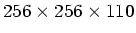 volume of 8-bit values. Because
the CT scan contains a lot of background (air), the dataset can be
significantly cropped without impinging on the engine block
itself12. We use
the Hessian second derivative measure to produce a
volume of 8-bit values. Because
the CT scan contains a lot of background (air), the dataset can be
significantly cropped without impinging on the engine block
itself12. We use
the Hessian second derivative measure to produce a  histogram
volume which includes first derivative values between zero and
126.7 and second derivative values between -127.6 and 127.6.
histogram
volume which includes first derivative values between zero and
126.7 and second derivative values between -127.6 and 127.6.
Figures 6.6(a) through 6.6(c) show a slice of the dataset and the two scatterplots. As mentioned in Section 4.4, there is the obvious mark of a boundary between the data values around 10 and 140, as well as fainter indications of boundaries between 140 and 255, and between 10 and 255. Incidently, from the fact that the curves ending at value 255 appear to be clipped on their right side, we can infer that the quantization of the raw data to eight bit values involved a somewhat aggressive clamping of high values.
Figures 6.6(d) through 6.6(f) are
the plots of  ,
,  , and
, and  calculated from the histogram
volume. The plot of includes an indication of the
calculated from the histogram
volume. The plot of includes an indication of the
 which was used for this dataset. Like the nested cylindrical shells
which were analyzed in Section 5.2, the engine
block has three boundaries, including one spanning the highest and
lowest values, from about 10 to 255. As is visible in the scatterplot
of second derivative versus data value, the presence of this boundary
exerts a negative influence on the average second derivative for the
data values above 140, which pushes the plot of downward for
the same range of values. Offsetting the location of the sign change
in in turn causes the curious shape of the graph--
around value 150 the graph of turns upward, not downward as we
would expect. Because is negative instead of positive at the
data value
which was used for this dataset. Like the nested cylindrical shells
which were analyzed in Section 5.2, the engine
block has three boundaries, including one spanning the highest and
lowest values, from about 10 to 255. As is visible in the scatterplot
of second derivative versus data value, the presence of this boundary
exerts a negative influence on the average second derivative for the
data values above 140, which pushes the plot of downward for
the same range of values. Offsetting the location of the sign change
in in turn causes the curious shape of the graph--
around value 150 the graph of turns upward, not downward as we
would expect. Because is negative instead of positive at the
data value  where
where
 is zero, in accordance with
Equation 5.10, is positive instead of
negative. However, the lower boundary, between 10 and 140, has such a
greater surface area that it is not influenced by the other boundary,
thus for lower data values, the plots of , , and
look as they should.
is zero, in accordance with
Equation 5.10, is positive instead of
negative. However, the lower boundary, between 10 and 140, has such a
greater surface area that it is not influenced by the other boundary,
thus for lower data values, the plots of , , and
look as they should.
This demonstrates that datasets containing boundaries with overlapping
ranges of data value cannot be correctly analyzed with this algorithm
to produce accurate opacity functions of data value alone. In
spite of this, the algorithm still generates passable results. Using
a simple triangular spike centered at  and extending one unit
on each side for the boundary emphasis function
(Figure 6.6(g)), the opacity function generated
(Figure 6.6(h)) produced the rendering seen in
Figure 6.6(j). The outer boundary is rendered well.
The boundary emphasis function was centered at instead of
and extending one unit
on each side for the boundary emphasis function
(Figure 6.6(g)), the opacity function generated
(Figure 6.6(h)) produced the rendering seen in
Figure 6.6(j). The outer boundary is rendered well.
The boundary emphasis function was centered at instead of
 to reduce the amount of air which is erroneously made opaque.
Manually removing the lower of the two bumps in
to reduce the amount of air which is erroneously made opaque.
Manually removing the lower of the two bumps in
 produced the
rendering seen in Figure 6.6(k). We see that the
surface boundaries are partially occluded by voxels which are not part
of the boundary and should have been made opaque. This is caused by
the small spike on the left side of the higher bump in
.
Manually removing it (Figure 6.6(i)), we see the
higher material boundary clearly (Figure 6.6(l)).
produced the
rendering seen in Figure 6.6(k). We see that the
surface boundaries are partially occluded by voxels which are not part
of the boundary and should have been made opaque. This is caused by
the small spike on the left side of the higher bump in
.
Manually removing it (Figure 6.6(i)), we see the
higher material boundary clearly (Figure 6.6(l)).
We now render the same dataset using two dimensional opacity
functions. The first step is to calculate the function  from
Equation 5.13. The result is shown in
Figure 6.7(a), with the aid of a colormap which is
blue for negative values, orange for positive values, with a dark
portion near zero. Because of this dark portion, we can see in the
image of those places in
from
Equation 5.13. The result is shown in
Figure 6.7(a), with the aid of a colormap which is
blue for negative values, orange for positive values, with a dark
portion near zero. Because of this dark portion, we can see in the
image of those places in  space where the position is
near zero, which corresponds to the middle of a boundary. The three
dark regions visible in the image of help clarify the fact
that there are three boundaries in the engine block dataset,
even if the three curves in the first derivative versus data value
scatterplot (Figure 6.6(b)) aren't easily visible.
The same boundary emphasis function used earlier for one dimensional
opacity function generation is used again to generate the
two dimension opacity function seen in Figure 6.7(b).
Three regions in the opacity function have been outlined and labeled;
the placement of these outlines was established by the locations of the
positive and negative positions visible in the image.
space where the position is
near zero, which corresponds to the middle of a boundary. The three
dark regions visible in the image of help clarify the fact
that there are three boundaries in the engine block dataset,
even if the three curves in the first derivative versus data value
scatterplot (Figure 6.6(b)) aren't easily visible.
The same boundary emphasis function used earlier for one dimensional
opacity function generation is used again to generate the
two dimension opacity function seen in Figure 6.7(b).
Three regions in the opacity function have been outlined and labeled;
the placement of these outlines was established by the locations of the
positive and negative positions visible in the image.
 |
The opacity function was used unchanged to produce the rendering in
Figure 6.7(c). For Figure 6.7(d), the
regions 1, 2, and 3 of the opacity function were included, excluding
the small area below region 1, thereby removing the small pieces of
background which were incorrectly made opaque in the previous
rendering. The outer surface in this rendering is noticeably cleaner
and more consistent than that seen in the rendering from the
one dimensional opacity function, Figure 6.6(j).
Next, region one was removed from the opacity function to show the
surface of the higher material components of the dataset
(Figure 6.7(e)). Next, region two is removed from the
opacity function, producing a rendering
(Figure 6.7(f)) which shows only the boundary between
the highest and lowest data values. Comparing the last two
renderings, we learn structural information about the dataset which
cannot be visualized with any one dimensional opacity function.

 in (b) and assign zero opacity outside the regions.